Chapter 5 Bootstrapping
The following packages are required for this chapter.
This chapter introduces simulation-based confidence interval techniques featuring the Bootstrap method, in contrast to the theory-based techniques of Chapter 4. After providing that contrast, the Infer package is introduced as a tool for constructing simulation-based confidence intervals.
5.1 Bootstrap Distributions
The key ingredient in Bootstrapping is sampling with replacement. It’s best to proceed by example. The following code creates a simple table containing a virtual box of balls numbered 1,2,…,10. It then calls the slice_sample() function twice, each time randomly sampling 5 balls with replacement from the virtual box of 10 balls. That means draw one ball, record the number, put it back in the box, draw another ball, put it back in the box, and so forth. The slice_sample() function defaults to replace=FALSE as it was used in Section 3.3 to sample from the dragon population without replacement. Below replace=TRUE overrides the default to sample with replacement.
box_of_balls <- tibble(
  balls = 1:10
)
box_of_balls
sample_with_replace1 <- slice_sample(box_of_balls, n=5, replace=TRUE)
sample_with_replace2 <- slice_sample(box_of_balls, n=5, replace=TRUE)
The output of the above code is shown below with the “box” of balls on the left, and the two with replacement samples on the right. Observe the effect of sampling with replacement. Since the ball is replaced after each draw, the same ball often ends up being drawn multiple times. This seems like a very strange way to do sampling, but it has very interesting applications in statistical simulations.
| box_of_balls |
|---|
| 1 |
| 2 |
| 3 |
| 4 |
| 5 |
| 6 |
| 7 |
| 8 |
| 9 |
| 10 |
| sample_with_replace1 |
|---|
| 2 |
| 9 |
| 9 |
| 9 |
| 5 |
| sample_with_replace2 |
|---|
| 7 |
| 7 |
| 3 |
| 3 |
| 6 |
To demonstrate a very cool application of sampling with replacement, we’ll return to the “real” data on dragon wingspans from Section 3.3 where a sample of \(n=75\) dragon wingspans was taken from a known population of dragons. That example will again be helpful here because knowing the population parameters allows us to assess how accurate inferences about the population made from the random sample actually are.
For a refresher on the dragon_sample, a histogram of the exact same \(n=75\) sample that was used in Section 3.3 is shown below, together with typical sample stats computed from it.
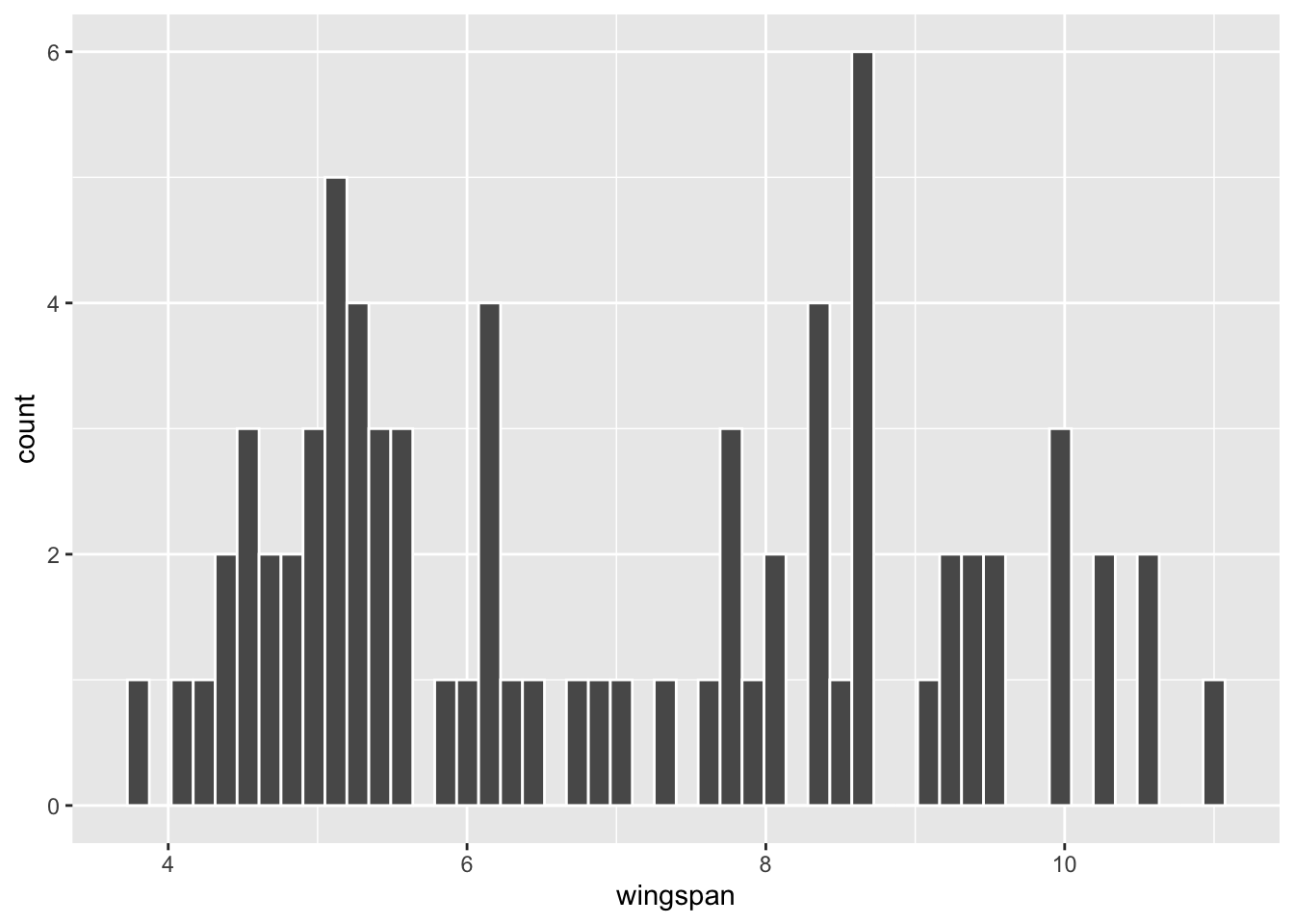
| sample_mean | sample_sd | n |
|---|---|---|
| 6.96 | 2.0049 | 75 |
Now, we’ll use the rep_slice_sample() (repetitive slice sampling) function that’s provided by the infer package. Recall that rep_slice_sample() was introduced in Section 3.3 to sample repetitively from the dragon population to demonstrate the Central Limit Theorem by computer simulation. But this time, the samples are actually re-samples of size 75 from the original size \(n=75\) dragon sample. Think about that for a second: the re-samples are taken from the sample (not the population) and are the exact same size as the sample. Without replacement that would accomplish nothing because each re-sample would be exactly the same as the original sample. However, when the re-samples are taken with replacement, each re-sample tends to be slightly different from the original.
The code below takes 10,000 distinct re-samples - with replacement - from the original n=75 sample, each re-sample being the same size as the original. Notice that replace=TRUE is added to the rep_slice_sample() function call to override the default. The result is the bootstrap_resamples table which has 750,000 rows, organized by the replicate numbers that keep track of the 10,000 distinct re-samples. The standard R view of the table only shows the first few wingspans from replicate #1.
library(infer) # contains rep_slice_sample() function
# 10,000 re-samples WITH replacement
bootstrap_resamples <- dragon_sample |>
  rep_slice_sample(n=75 , reps=10000 ,  replace=TRUE)
bootstrap_resamples
## # A tibble: 750,000 × 2
## # Groups:   replicate [10,000]
##    replicate wingspan
##        <int>    <dbl>
##  1         1      8.6
##  2         1      8.6
##  3         1      7.6
##  4         1      5
##  5         1      8.3
##  6         1      9.4
##  7         1      9.4
##  8         1      4.6
##  9         1      5.1
## 10         1      8.6
## # ℹ 749,990 more rows
The code below groups the bootstrap_resamples by the replicate numbers in order to compute a separate mean for each of those 10,000 re-samples. The result is the bootstrap_distribution_of_means table, only the first few rows of which are shown. It has 10,000 rows, each containing the mean of one of the re-samples.
# Calculate a separate mean for each of the 10,000 re-samples
bootstrap_distribution_of_means <- bootstrap_resamples |>
  group_by(replicate) |>
  summarize(resample_mean = mean(wingspan))
bootstrap_distribution_of_means
## # A tibble: 10,000 × 2
##    replicate resample_mean
##        <int>         <dbl>
##  1         1          7.27
##  2         2          6.89
##  3         3          6.71
##  4         4          6.98
##  5         5          6.98
##  6         6          6.99
##  7         7          7.48
##  8         8          6.49
##  9         9          6.98
## 10        10          6.91
## # ℹ 9,990 more rows
It’s important to stop and reflect upon the bootstrap_distribution_of_means table. Because of sampling with replacement, some dragons from the original sample might be included twice, or even more, in a re-sample. Other dragons from the original sample might not even be included in a re-sample. Therefore, each re-sample tends to have a different mean as you can see in the bootstrap_distribution_of_means table. In essence, each re-sample is kind of a “phantom sample” or “tweaked sample” that bears some resemblance to the original sample in that all members of the re-sample are drawn from the original sample, but yet the re-sample is subtly different.
Effectively, the re-samples from the sample induce sampling variation, thereby simulating the sampling variation that would be inherent when sampling from the population. In other words, each re-sample simulates the act of taking a different original random sample from the population. It follows that a very large number of such re-samples, say 10,000, should model the \(n=75\) sampling distribution.
The code below produces the histogram on the right side of Figure 5.1. It shows the distribution of the 10,000 bootstrap_distribution_of_means computed above. The two plots on the left side of Figure 5.1 show similar bootstrap distributions of re-sampled means, just using fewer repetitions.
# Histogram of Bootstrap Distribution for the 10,000 bootstrap_distribution_of_means
bootstrap_distribution_of_means |>
  ggplot(aes(x = resample_mean)) +
  geom_histogram(bins = 30, color = "white") +
  labs(x = "Bootstrap Sample Means")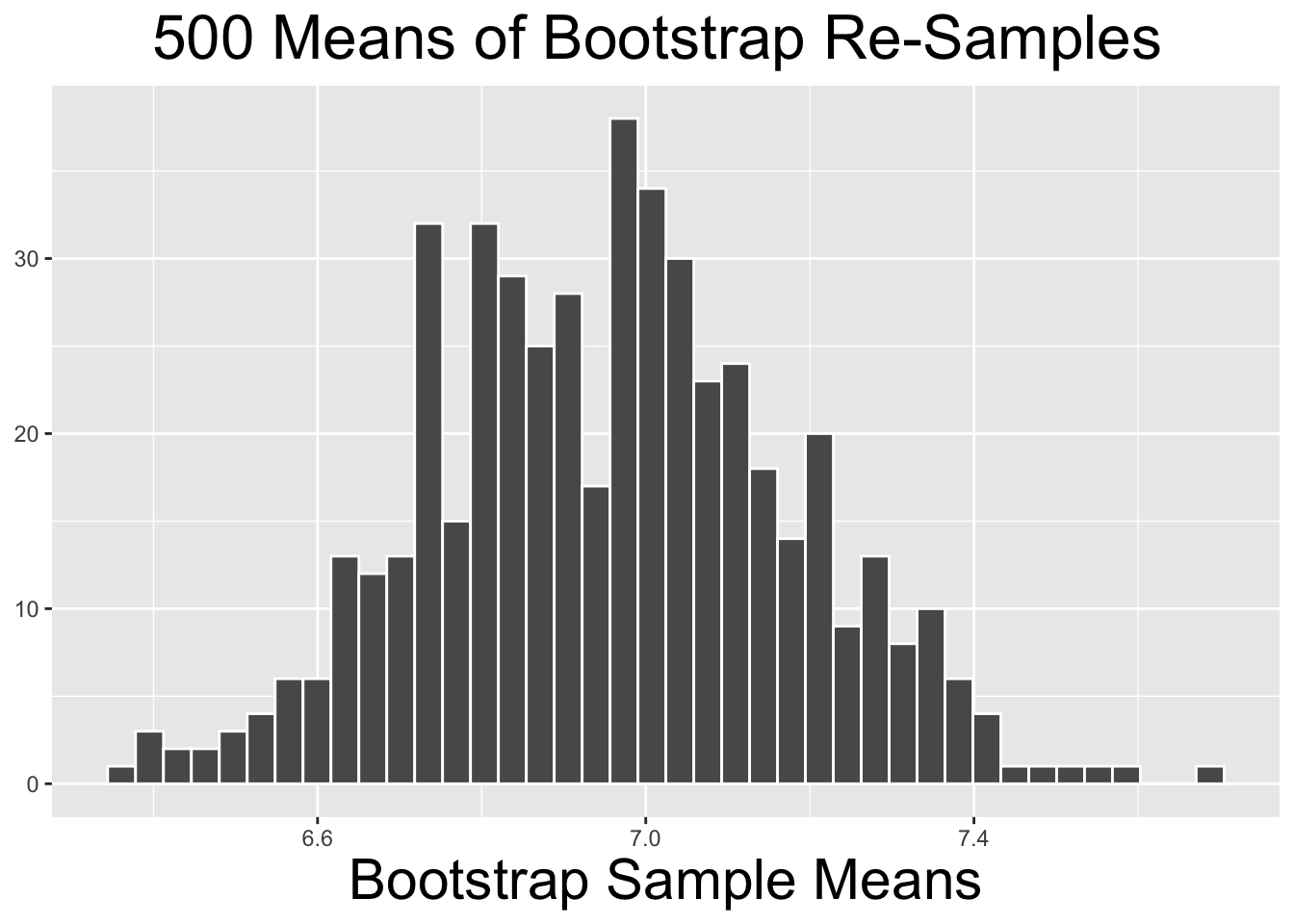
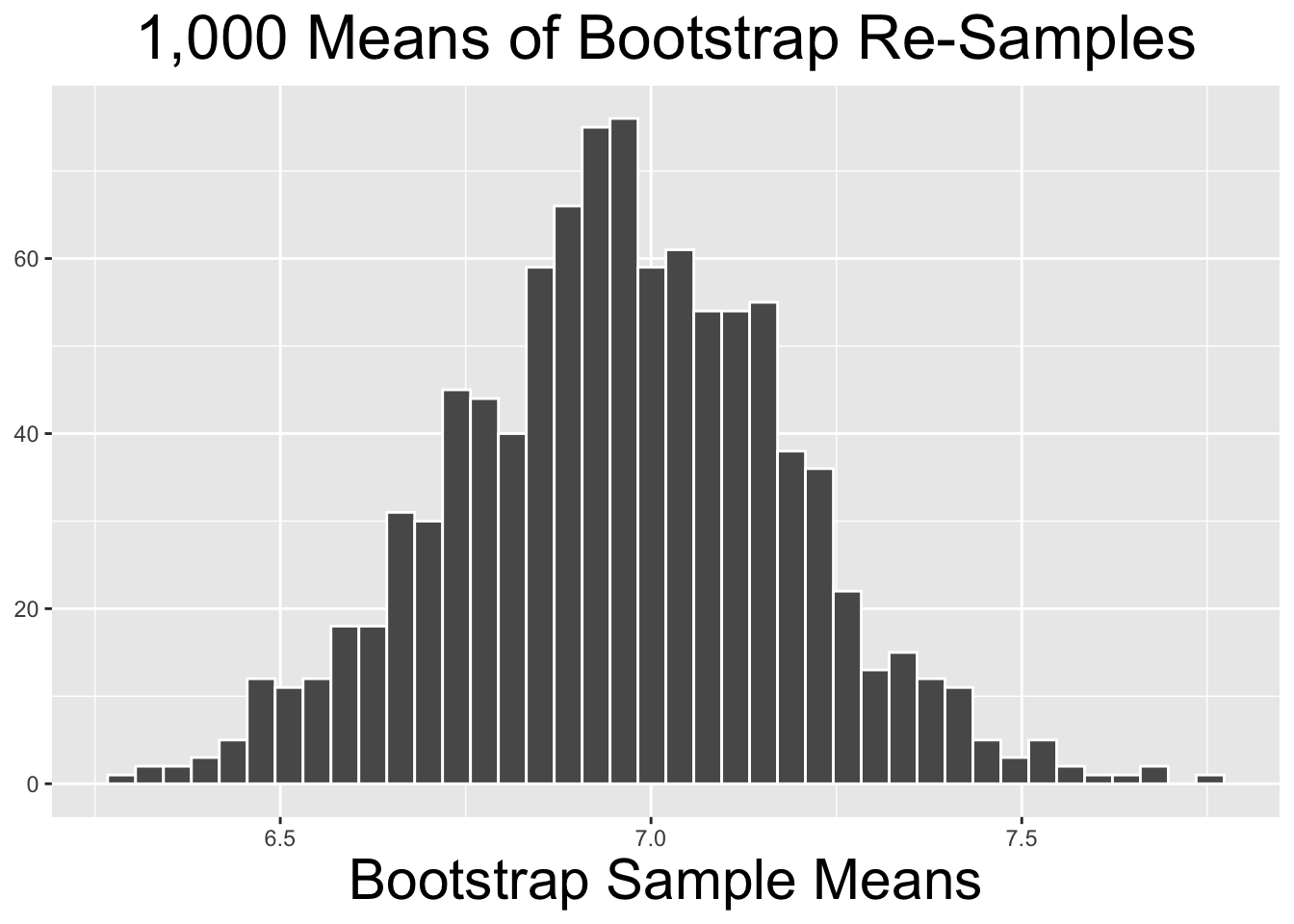
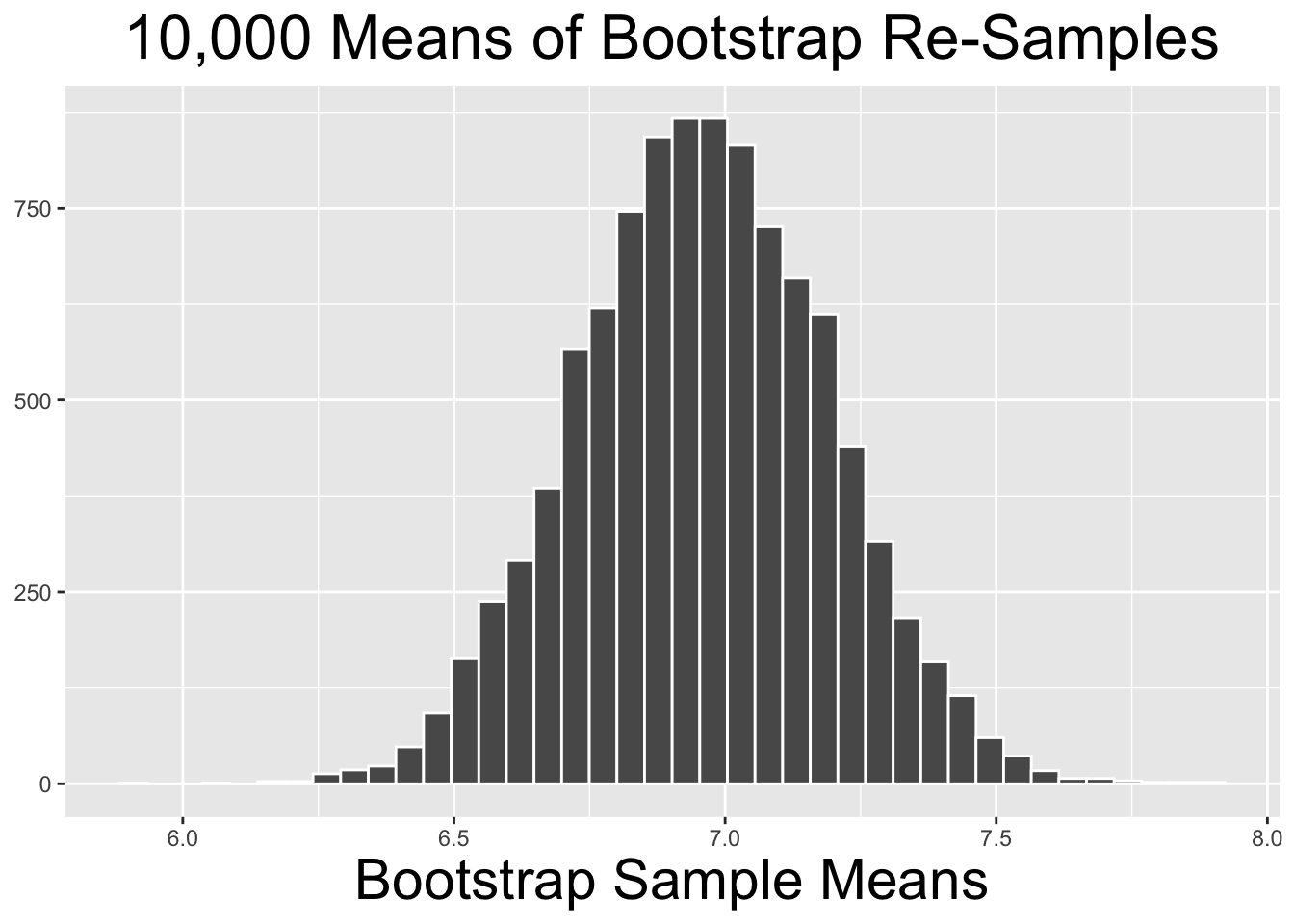
Figure 5.1: Bootstrap Distributions for Different Numbers of Repetitions
The two bootstrap distributions on the left of Figure 5.1 obviously appear less normal than the one on the right. As a general principle, the more re-sample repetitions that go into a bootstrap distribution, the more normal the bootstrap distribution tends to be. Fewer bootstrap repetitions tend to be needed if the original sample is normal-ish. In general, 10,000 repetitions is usually adequate and easily doable with typical desktop computing power. In some situations - a very large original sample for example - it can be desirable to do 100,000, a million, or even more repetitions. But it may require more than typical computing power to run such large numbers of repetitions relatively quickly.
Having explained the basic concepts through examples, it’s instructive to formally define the terminology pertinent to bootstrap distributions.
Bootstrap Terminology
Given an original sample of size \(n\), a bootstrap sample is a re-sample with replacement of size \(n\) from the original sample. A sample statistic, such as a mean, computed from a bootstrap sample is likely somewhat different from that of the original sample. When multiple bootstrap samples are taken, the resulting collection of bootstrap sample statistics is called a bootstrap distribution. A bootstrap distribution is a simulated sampling distribution constructed solely from the original sample. The mean and standard deviation of a bootstrap distribution are examples of bootstrap statistics - descriptive statistics of the bootstrap distribution.
Having computed the bootstrap_distribution_of_means above for 10,000 bootstrap samples, it’s a simple matter to compute the bootstrap statistics that describe the bootstrap distribution.
# Calculate the Bootstrap Statistics
bootstrap_distribution_of_means |>
  summarize(
      bootstrap_distribution_mean = mean(resample_mean),
      bootstrap_distribution_SE = sd(resample_mean)
  )
## # A tibble: 1 × 2
##   bootstrap_distribution_mean bootstrap_distribution_SE
##                         <dbl>                     <dbl>
## 1                        6.96                     0.231
It is important to understand that the bootstrap statistics computed above are the mean and standard deviation of the 10,000 repetition bootstrap distribution shown on the right side of Figure 5.1. The bootstrap distribution mean of 6.96 is exactly the same as the mean of the original sample. In general, the mean of the original sample is the expectation for the mean of a bootstrap distribution. That makes sense since each of the bootstrap samples is a “tweak” of the original sample.
The bootstrap distribution standard deviation of .231 is very close to the \(SE=.257\) of the sampling distribution that was computed using the Central Limit Theorem in Section 3.4. Since each bootstrap sample simulates the act of taking a different original random sample from the population, it makes sense that the bootstrap distribution standard deviation is close to the sampling distribution SE.
The procedure outlined above is often simply called Bootstrapping and is summarized below.
Bootstrapping Procedure:
- Take an original random sample of size \(n\) from the population.
- Compute a bootstrap distribution by calculating a sample statistic (mean, proportion, etc.) separately from each of many bootstrap samples taken repetitively from the original sample.
- The bootstrap distribution will be approximately normal for a large enough number of repetitions, say 10,000.
- The standard deviation of the bootstrap distribution - a bootstrap statistic - is a simulated estimate for the SE of the size \(n\) sampling distribution.
5.2 Bootstrap Confidence Intervals
One of the main applications of bootstrapping is for computing confidence intervals. This section explores two methods for constructing a CI from a bootstrap distribution: the Standard Error (SE) Method and the Percentile method. We’ll begin with the SE method.
Bootstrap Standard Error (SE) Method
The SE estimate for the CI is the standard deviation of the bootstrap distribution. The CI centered on the sample mean \(\bar{x}\) is constructed as usual, with endpoints \(\bar{x} \pm z_{\alpha/2} \cdot SE\). This assumes that the bootstrap distribution is approximately normal with minimal skew.
For an example, we’ll continue with the 10,000 repetition bootstrap_distribution_of_means table that was computed in the previous section. The distribution of those bootstrap sample means is shown on the right of Figure 5.1, and the standard deviation bootstrap statistic was computed to be \(SE=.231\). As discussed in the previous section, the bootstrap SE is a computational estimate of the sampling error for samples of size \(n=75\). The resulting 95% bootstrap CI centered on the observed sample mean \(\bar{x}=6.96\) is calculated below using the \(z_{\alpha/2}=1.96\) multiplier from the standard normal distribution.
# 95% CI using bootstrap distribution SE
SE <- .231
z_alpha2 <- 1.96   # 95% CI
c(6.96 - z_alpha2*SE, 6.96 + z_alpha2*SE)
## [1] 6.51 7.41
Now for the bootstrap Percentile method. After the definition, we’ll proceed with the same example for the sake of comparison.
Bootstrap Percentile Method
The endpoints of the CI are percentiles calculated from the bootstrap distribution. The percentiles are determined by the total tail area \(\alpha\). This does not require the bootstrap distribution to be approximately normal. If it is skewed, the CI may not be exactly centered on the sample mean \(\bar{x}\).
For example, the total of both tail areas for a 95% CI is 5%. So the lower endpoint of the percentile method CI is the 2.5th percentile, and the upper endpoint is the 97.5th percentile. That is, if all 10,000 numbers in the bootstrap_distribution_of_means table are sorted in increasing order, the 2.5th percentile is approximately the 250th number and the 97.5th percentile is approximately the 9,750th one. That’s easily computed using the quantile() function as shown below. The calculation could also have been done using two separate function calls like quantile(data, .025), but sending both percentiles to the function as a vector gets the job done with only one function call.
Chapter 4 presented theory-based confidence intervals derived using mathematics and the Central Limit Theorem. This section has introduced simulation-based confidence intervals using computational bootstrapping. Before moving on, it’s worth stepping back from the details for a general comparison. A 95% CI is used below for the sake of discussion, but the idea applies to any confidence level.
Simulation-Based vs Theory-Based Confidence Intervals
Section 4.1 pointed out that a theory-based 95% CI is essentially the center 95% of the theoretical \(\mu\)-centered sampling distribution, but recentered around the sample mean \(\bar{x}\). In a bootstrap simulation, there is no theoretical \(\mu\)-centered sampling distribution, just a simulated \(\bar{x}\)-centered bootstrap distribution. A bootstrap CI is also the “center” 95% of the bootstrap distribution. The bootstrap SE and percentile methods just calculate the notion of “center” in different ways.
The bootstrapped CIs from each of the SE and Percentile methods are very similar, actually the same if rounded to two decimal places. For further comparison, we’ll compute the theory-based 95% CI derived from the Central Limit Theorem as shown in Section 4.3 using a T Distribution with 74 degrees of freedom. The calculation is shown below.
# Theory-based 95% CI using T distribution
s <- 2.0049          # from dragon sample
SE <- s/sqrt(75)     # CLT
t_alpha2 <- qt(.975, df=74)
c(6.96 - t_alpha2*SE, 6.96 + t_alpha2*SE)
## [1] 6.50 7.42
And finally, we might as well throw in the CI computed in Section 4.1 using the known population standard deviation \(\sigma\) in \(SE = \frac{\sigma}{\sqrt{n}}\) instead of substituting \(s\). All 4 CIs are shown below for comparison.
| Method | CI |
|---|---|
| Simulation-based Bootstrap SE | \([6.51,7.41]\) |
| Simulation-based Bootstrap Percentile | \([6.51,7.41]\) |
| Theory-based (substitute s for \(\sigma\)) | \([6.50,7.42]\) |
| Theory-based (known \(\sigma\)) | \([6.46,7.46]\) |
The CIs in the top three rows above are all calculated entirely using the dragon sample. However, the bottom row is calculated from a known population parameter, a luxury usually not available when doing inference. Thus, one might expect the bottom one to be somewhat different from the others since taking the sample involves sampling error. But the main takeaway from this is that the theory-based CI derived from Mathematics/CLT and the sample sd \(s\) is very similar to the simulation-based bootstrapped ones, within .01 in fact.
For an example involving real data, recall the tvhours_2018 sample from the GSS survey used in Section 4.2. The code below re-creates it exactly as before: the survey is imported, and the 2018 tvhours records are kept with the NA values removed.
gss_survey <- read_csv("http://www.cknuckles.com/statsprogramming/data/gss_survey_data.csv")
tvhours_2018 <- gss_survey |>
  filter(year == "2018") |>
  select(tvhours) |>
  drop_na(tvhours)
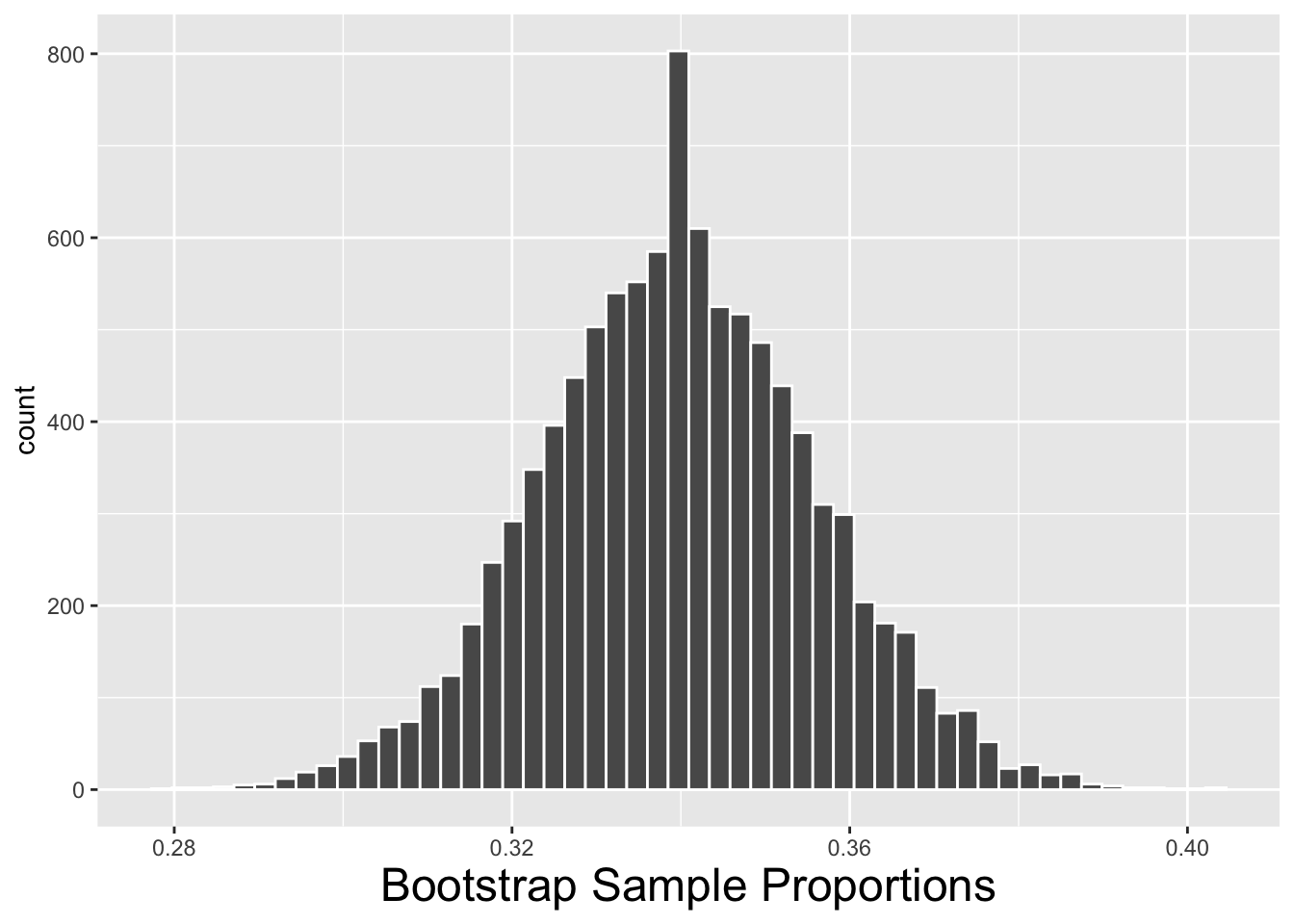
We’ll compute a 99% bootstrap CI using each method presented above. The calculations to derive the bootstrap_distribution_of_proportions are shown below. The table contains 10,000 resample_proportion values, each being the proportion of couch potatoes in a re-sample. The only difference between the code below and that of the previous section is that 10,000 proportions are calculated instead of means.
# Bootstrap Distribution of 10,000 Proportions
bootstrap_distribution_of_proportions <- tvhours_2018 |>
  rep_slice_sample(n=833 , reps=10000 ,  replace=TRUE) |>
  group_by(replicate) |>
  summarize(
    num_couch_potatoes = sum(tvhours >= 3),
    n = n(),
    resample_proportion = num_couch_potatoes/n   # proportion of couch potatoes
  )
# Bootstrap Statistics from the Bootstrap Distribution
bootstrap_distribution_of_proportions |>
  summarize(
      boot_dist_mean = mean(resample_proportion),
      boot_dist_SE = sd(resample_proportion)
  )
The bootstrap statistics from the 2nd block of code above are shown below on the right. The code that creates the histogram of the bootstrap distribution on the left is not shown. Note that the boot_dist_mean is the average of the 10,000 proportions. It is almost exactly equal to the original sample proportion \(\hat{p}\) as is expected.
| boot_dist_mean | boot_dist_SE |
|---|---|
| 0.3397 | 0.0164 |
The calculation for the bootstrap SE method CI is shown below. Of course, the CI is centered on the observed sample proportion \(\hat{p}=.340\) and the SE bootstrap statistic was computed above from the bootstrap distribution.
# Bootstrap SE method 99% CI
SE <- .0164
z_alpha2 <- 2.58   # 2.58 = qnorm(.995, mean=0, sd=1)
c(.340 - z_alpha2*SE, .340 + z_alpha2*SE)
## [1] 0.298 0.382
The calculation for the bootstrap percentile method CI is shown below. The calculation is quite simple assuming that the correct .005 (left) and .995 (right) tail areas are used for a 99% CI.
# Bootstrap Percentile method 99% CI
quantile(bootstrap_distribution_of_proportions$resample_proportion, c(.005,.995))
##  0.5% 99.5%
## 0.298 0.383
The two bootstrap CIs are shown below, and for comparison so is the theory-based 99% CI that was calculated in Section 4.2. As you can see they are very, very close up to 3 decimal places. The .001 discrepancy in the right endpoint of the Bootstrap Percentile CI could easily be the result of rounding off some of the numbers used in the calculations or the way percentiles for finite samples are calculated.
| Method | CI |
|---|---|
| Simulation-based Bootstrap SE | \([.298,.382]\) |
| Simulation-based Bootstrap Percentile | \([.298,.383]\) |
| Theory-based (substitute \(\hat{p}\) for \(p\)) | \([.298,.382]\) |
CIs constructed by \(\pm\) a multiple of an SE estimate, either derived from bootstrapping or math, are always centered on the observed sample statistic (\(\hat{p}\), \(\bar{x}\), …). However, because of the way a Bootstrap Percentile CI is constructed, the sample statistic may not be exactly in the center of the CI. If the bootstrap distribution is roughly symmetric, then the sample statistic should be roughly in the center of the Bootstrap Percentile CI.
Observe the summary of the 10,000 bootstrap sample proportions below which shows that the mean and median of that bootstrap distribution are equal. That indicates that the bootstrap distribution is not skewed. Therefore it is no surprise that both bootstrap CI methods produced roughly the same result.
summary(bootstrap_distribution_of_proportions$resample_proportion)
##    Min. 1st Qu.  Median    Mean 3rd Qu.    Max.
##   0.279   0.329   0.340   0.340   0.351   0.403
Having done comparisons between the two bootstrap CI methods, and also comparing bootstrapping to the traditional theory-based methods, natural questions arise: Which is more accurate in general? Which method should I use in a given situation? The question of theory-based vs bootstrap is more tricky to answer, so we’ll defer that until the next section. But when bootstrapping, the question of SE method vs percentile method is more easily answered. In fact, the discussion just above about symmetry of the bootstrap distribution gives a strong clue.
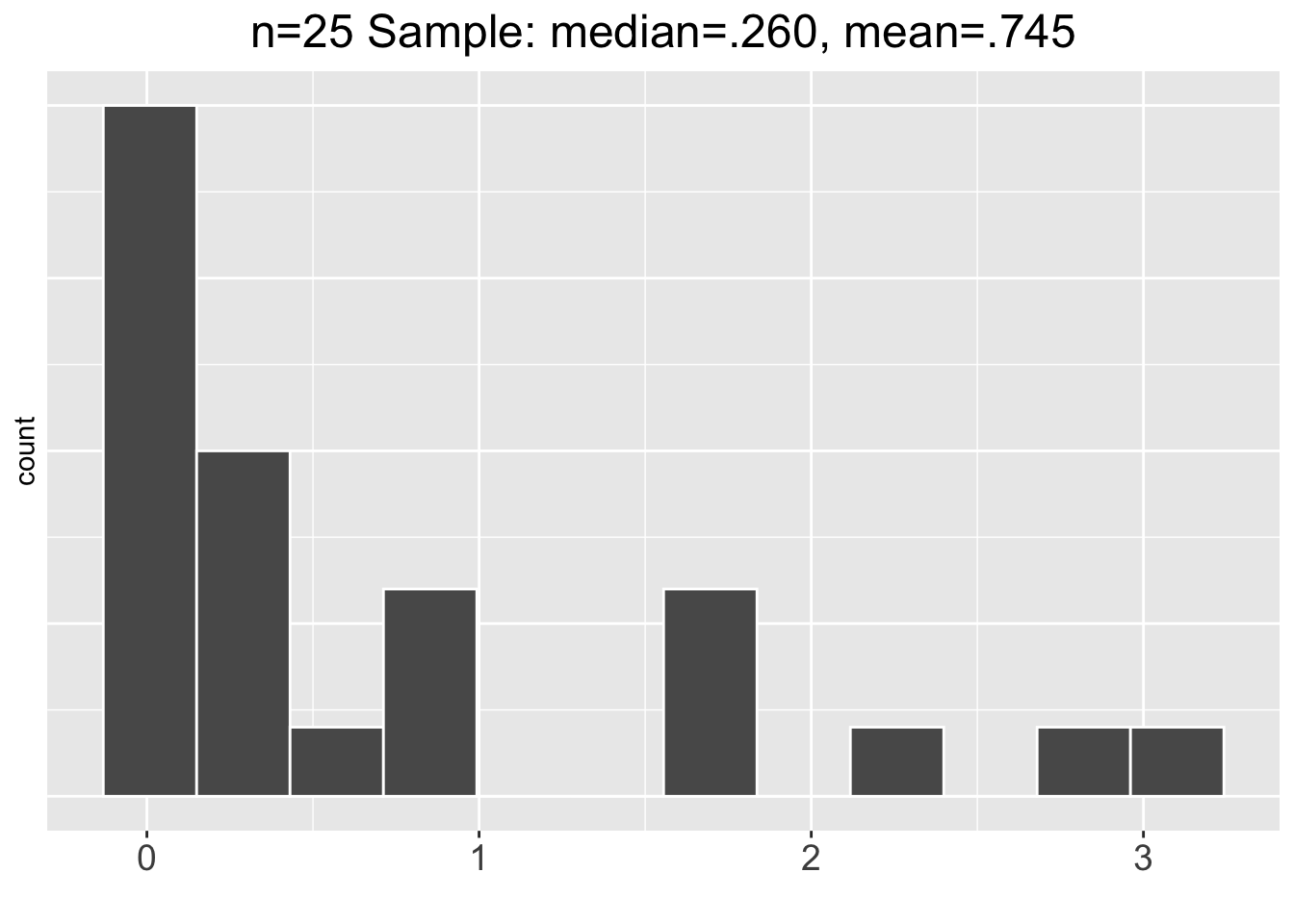
To further explore that, consider the example below of a sample that’s highly skewed. The distribution of this size \(n=25\) sample is shown below on the left, and a 10,000 repetition bootstrap distribution is shown on the right. The sample is highly skewed right: \(median=.260\), \(mean=.745\). It’s not obvious visually, but the bootstrap distribution is also skewed right: \(median=.736\), \(mean=.745\). The 10,000 re-sample bootstrap procedure has substantially lessened the skew, but it’s still there.
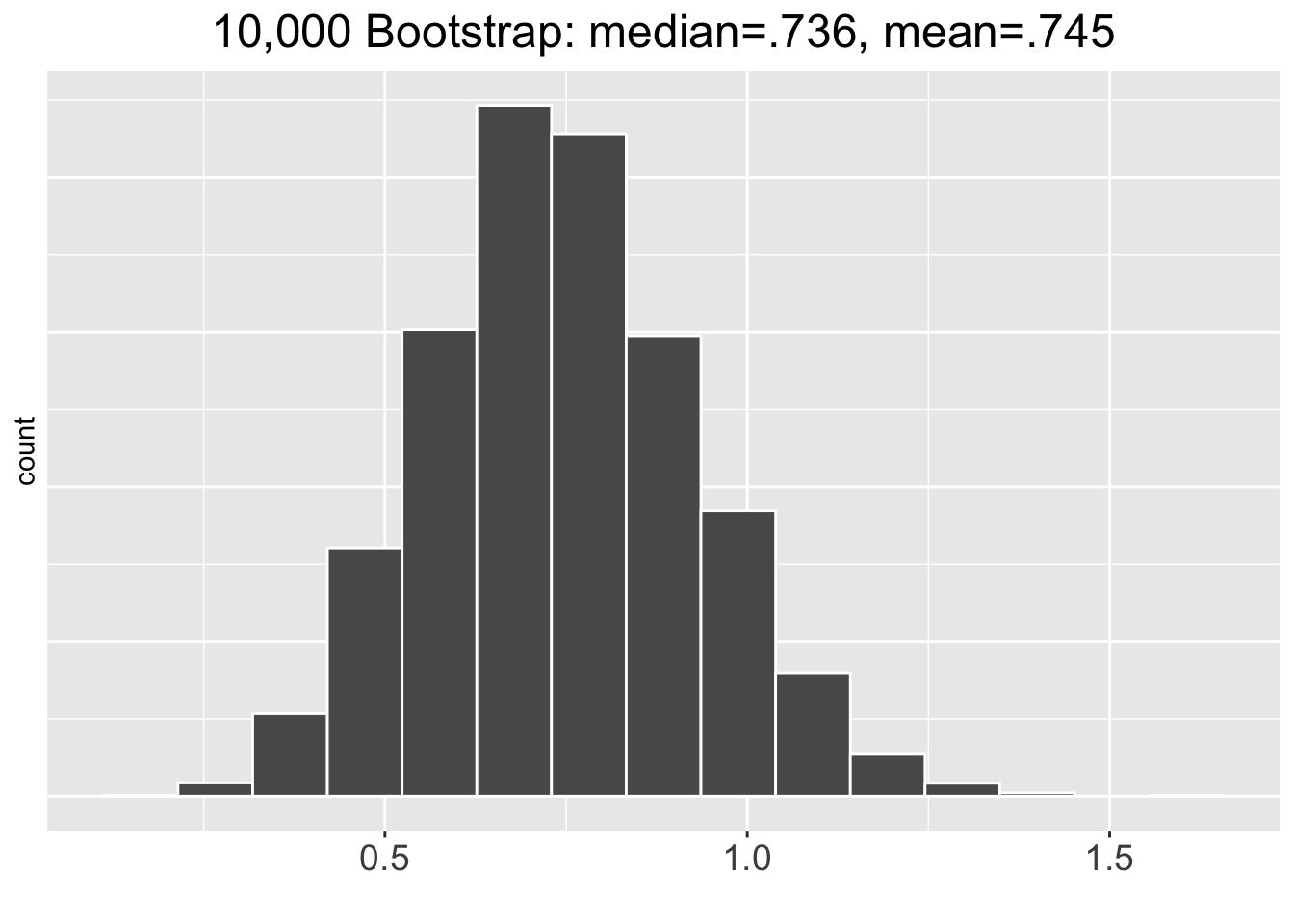
For the above skewed data, the bootstrap SE method 95% CI is \([.386,1.103]\) and the percentile method 95% CI is \([.403,1.120]\). Even though the skew of the bootstrap distribution seems minimal, the two bootstrap CI methods produce significantly different results. In situations with a highly skewed sample that results in a skewed bootstrap distribution, the bootstrap percentile method is generally considered to be more accurate. This is especially true when the sample size is small as in the previous example.
The curious reader may wonder whether doing 100,000 or even a million bootstrap re-samples would make any difference. In the \(n=25\) highly skewed sample discussed just above, upping the bootstrap repetitions to 100,000 results in changes on the order of magnitude of about .0001 which is within the round off error. In this case, doing 1 million bootstrap repetitions offers no significant improvement, and takes several seconds to complete on a fast desktop computer.
In many situations, 10,000 bootstrap repetitions is enough. In a highly sensitive analysis with lots of decimal place accuracy required, one would ideally increase the number of bootstrap repetitions until the results stabilize at the desired accuracy. For example, if 4 decimal places of accuracy is desired and a 10,000 repetition bootstrap tends to give a different result in the 4th decimal place each time you run it, then try again with 100,000. Hopefully that stabilizes, giving the same result to 4 decimal places each time you run it. If not, up the repetitions again. But keep in mind that both the size of the sample being bootstrapped and the number of repetitions increase the computation time, which could become a limitation on a typical desktop computer in which case a more powerful computer system could be used.
5.3 Why Bootstrap?
The phrase to “pull yourself up by your bootstraps” has been commonly used in literature and colloquial conversations for centuries. It means that you improve your situation exclusively through your own efforts, without any other help. The bootstrap simulation procedure in statistics borrows from that notion in that the data is “pulling itself up by its own bootstrap.” Suppose you have a sample of data, with absolutely no other assumptions about the population from which the data was drawn. Without such assumptions, mathematical theory provides little or no help in inferring about population parameters. The bootstrap procedure, using ONLY the sample itself, allows you to infer about population parameters by simulating the sampling error inherent in random sampling. Bootstrap “tweaking” of the sample many thousands of times to obtain “alternate” samples simulates the theoretical concept of a probability model for the space of all possible samples of that size.
The previous chapter presented theory-based (math/CLT) methods of inference, and this chapter has presented simulation-based (bootstrap) methods. You may have noticed that the mathematics for the various types of CIs presented in Chapter 4 depend on normality and other assumptions. In the world of theory-based inference, it’s all about assumptions, assumptions, assumptions.
It’s instructive to clarify this discussion by highlighting when theory-based CIs are not reliable. The theory-based mathematical CIs presented in Chapter 4 are NOT valid for:
- Single proportion CIs when the sample size is small or \(\hat{p}\) is close to 0 or 1 (\(np\ge 10\) fails).
- Single mean CIs when the population is not normal-ish and sample size is small.
- Any “difference of” CI when the samples aren’t totally independent.
- Difference of proportion CIs when the sample size is small or \(np\ge 10\) fails for either sample.
- Difference of means CIs when either population is not normal-ish, or either sample size is small, or the samples have significantly different standard deviations.
The above points are basically the logical negations of the required assumptions for theory-based CIs that were listed in Chapter 4. In some cases when the assumptions don’t hold and the theory-based CI presented in Chapter 4 is not reliable, there are more advanced theory-based approaches that might work. Such topics are often covered in detail in advanced stats courses or even graduate school.
The mathematics for Non-Parametric inference are particularly gnarly. The mathematical theory for parameter estimation (mean, standard deviation, variance,…), is based on assumptions about an underlying probability distribution. In contrast, quantities such as medians and percentiles are called Order Statistics because they are based on a linear ordering of the sample, not a formula derived from a probability distribution model. The term Non-Parametric Statistics, also called distribution-free statistics, essentially refers to inference about such non-parameter order statistics. There are some theory-based techniques for non-parametric statistical analyses, but the situation is much more difficult since sampling error SE estimates are complicated, often being semi-reliable mathematical approximations themselves, or even impossible to calculate mathematically.
In applications such as non-parametric analyses, bootstrapping (and other simulation techniques) provide an alternative when mathematical theory isn’t sufficient. Even for a routine non-parametric analysis, like inferring about an unknown population median or quartile, bootstrapping may be the most appropriate option. But even bootstrapping has its limitations, being most reliable when inferring about a non-parametric value near the “middle” of a sample, rather than about extreme values near the “edges” of a sample.
The list below provides a quick overview summarizing important points about bootstrapping, including the points discussed just above and also things observed in the examples in the previous sections of this chapter. In short, no data scientists should be without Bootstrapping in their toolkit!
- When the assumptions hold and the theory-based approach to estimating the SE is robust, bootstrapping tends to give very similar results.
- When the data doesn’t fully satisfy the assumptions required by mathematics, the bootstrap simulation-based approach tends to give more reliable results.
- The traditional mathematical approaches for certain types of statistical inference, such as non-parametric analyses, tend to be less robust than those for parametric analyses. In some cases, sampling error estimates are problematic or impossible using mathematics. Simulation-based approaches like bootstrap may be the only viable option.
- Bootstrap sampling is used in various machine learning algorithms. In that context, the technique is called bootstrap aggregating, or simply bagging.
- The huge leap forward in computing power has made simulation-based techniques much more practical for the average person. (Some might argue that no statisticians are average people!) Even as recent as the year 2000, running complex simulation-based models with tens of thousands of iterations might be problematic without access to clusters or supercomputers.
- New tools such as the Infer package make it much easier to do simulation-based inference for people who are not experienced programmers.
The obvious question that arises from this discussion is the following:
Which inference method should be used in a given situation?
It’s not just a question of theory-based vs simulation-based, which may answer itself based upon whether the assumptions required for a theory-based inference are satisfied (or almost). This question often arises even when choosing between different theory-based approaches which abound in advanced statistical books and research papers. Even highly experienced statisticians may disagree upon which approach is best. Inferential statistics is about estimating things, which is rarely an exact science.
The answer to the question is often simply about convention - what’s accepted practice in a given research field. For example, social sciences (psychology, anthropology, …) may have somewhat less rigorous guidelines than medical and pharmaceutical sciences. In many cases, the question resolves to what statistical analysis is acceptable to peer-refereed science journals. In some cases, the answer to the question might be dictated by a bureaucratic or government agency. For example, a pharmaceutical company might submit a study to the US FDA (Food and Drug Administration) to seek approval for a new drug. The FDA Ph.D statisticians might request or demand an alternate statistical analysis be submitted for the sake of comparison. Those Ph.D statisticians might not even have been in full agreement, but want to weigh different analyses of data. There’s really no better way to answer the question than to learn as many statistical tools as you can, and then gain insight through experience as to what type of analysis is most appropriate, or perhaps even required, in certain situations.
5.4 Infer Package
The rep_slice_sample() function from the infer package was used earlier in this chapter to repetitively re-sample to create bootstrap distributions. The infer package is very useful in general for various types of simulation-based inference, such as computing bootstrap CIs. The following excerpt was taken from the package’s Web site infer.netlify.app: “The objective of this package is to perform statistical inference using an expressive statistical grammar that coheres with the tidyverse design framework.”
Infer is not formally part of the Tidyverse, but it is “Tidyverse friendly” in the way it works, from “pipeable functions” (your new friend the |> operator) to using an “expressive” grammar to make piped sequences of function calls more human readable. Recall that the “gg” in ggplot stands for the “grammar of graphics.” Similarly, the infer package’s grammar cleanly expresses the work flow of bootstrap simulation-based inference. It also simplifies the work flow by burying some of the computational complexity inside intuitively named function calls.
The examples below use the workhours_2018 and tvhours_2018 samples from the GSS survey. tvhours_2018 was re-created in Section 5.2; the code below re-creates workhours_2018 the same way, from the gss_survey table imported there.
To introduce the infer package grammar, we’ll return to the familiar workhours_2018 sample from the GSS survey used in Section 4.3 to construct a theory-based CI for the mean hours worked in the population. The code on the right below shows how a bootstrap distribution would be constructed using the dplyr package. That idea should be familiar to you from the bootstrap examples in the previous section. The code on the left shows how to do the same thing using functions from infer. In particular:
specify()which variable (column) in the table should be used.generate()10,000 repetitions of bootstrap samples.calculate()the mean statistic for each bootstrap sample.
The specify, generate, calculate grammar is quite intuitive. These functions obscure some of the computational details by internally handling tasks such as rep_slice_sample() and group_by(). The resulting bootstrap_distribution shown on the left below is very similar to bootstrap distributions we have manually computed using Dplyr. The only difference is that the bootstrap sample means are stored in a column named stat, whereas we chose to use names such as resample_mean. On the right below, the handy visualize() function, also provided by the infer package, plots a histogram of the bootstrap distribution, internally handling the necessary ggplot details.
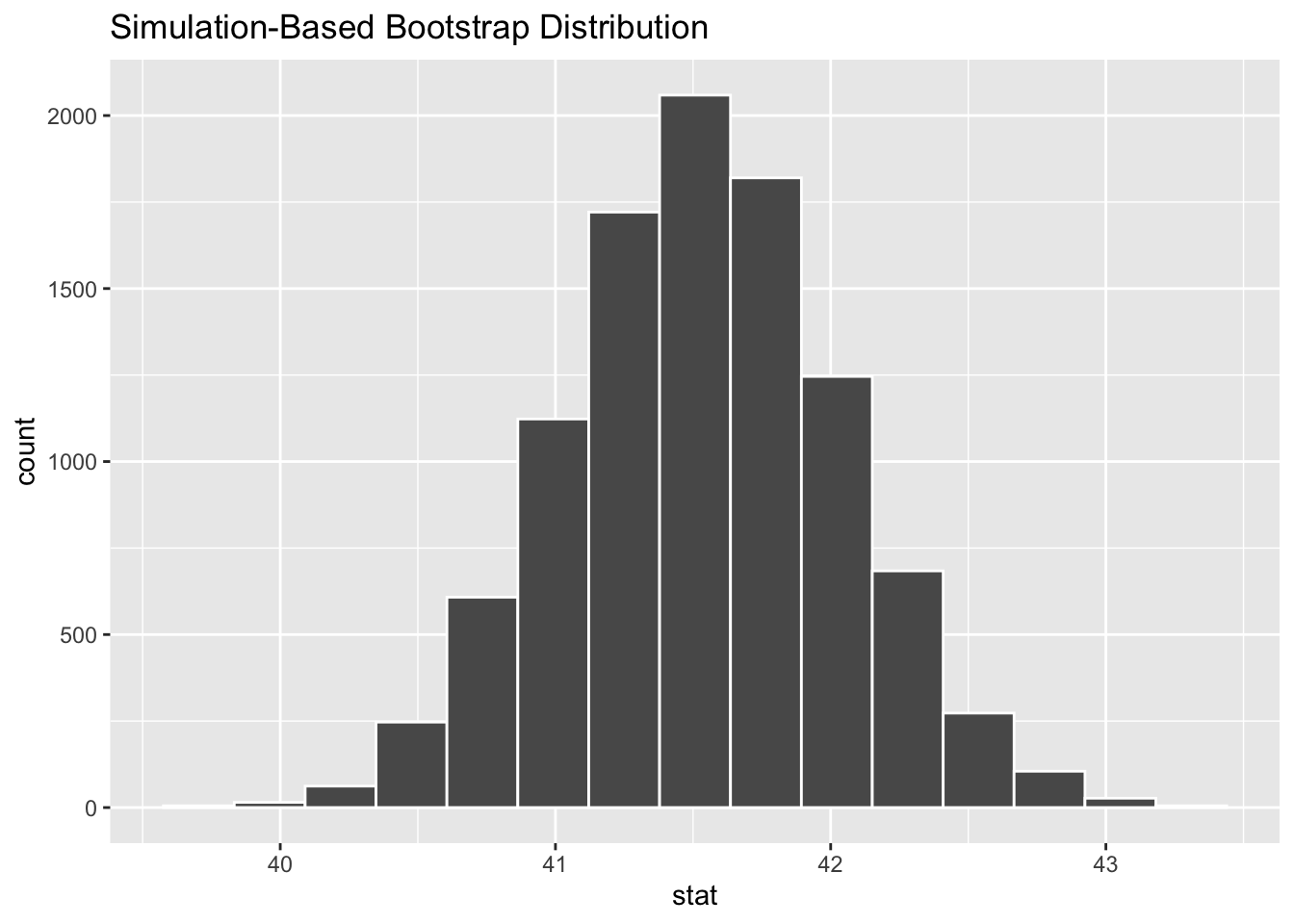
Once the bootstrap distribution is computed, the Infer package get_ci() function will quickly generate each type of bootstrap CI at the desired confidence level as shown below. The workhours_2018 data is normal-ish with a large sample size, so it’s no surprise that both bootstrap CIs are very similar to the 95% theory-based CI of approximately [40.5, 42.5] computed in Section 4.3.
bootstrap_distribution |>
  get_ci(level=.95, type = "percentile")
## # A tibble: 1 × 2
##   lower_ci upper_ci
##      <dbl>    <dbl>
## 1     40.5     42.5

bootstrap_distribution |>
  get_ci(level=.95, type = "se", point_estimate=41.53)
## # A tibble: 1 × 2
##   lower_ci upper_ci
##      <dbl>    <dbl>
## 1     40.5     42.5
Again, the infer package get_ci() function calls have obscured some of the computational details such as calculating the percentiles in the first call above, and the bootstrap distribution SE in the second one. Also, get_ci(type = "se") requires the point_estimate value of \(\bar{x}\) computed from the sample to create an \(\bar{x}\)-centered CI. The value of \(\bar{x}=41.53\) had already been computed in Section 4.3, but the Infer calculate() function can easily compute it as shown below.
# Calculate original sample mean (by leaving out call to generate() bootstrap samples)
workhours_2018 |>
  specify(response = workhours) |>
  calculate(stat = "mean")
## Response: workhours (numeric)
## # A tibble: 1 × 1
##    stat
##   <dbl>
## 1  41.5
If the call to generate() bootstrap replicates were put back in before calculate() above, it would compute a separate mean for each bootstrap sample, rather than just \(\bar{x}\) for the original sample as above.
The infer package also offers the shade_ci() function to help visualize how a confidence interval relates to the bootstrap distribution. Figure 5.2 shows the result of adding a shade_ci() layer on top of a bootstrap visualize() plot.
bootstrap_distribution |>
  visualize() +                            # Histogram only
  shade_ci(endpoints = c(40.549,42.511))   # Add shaded plot layer for CI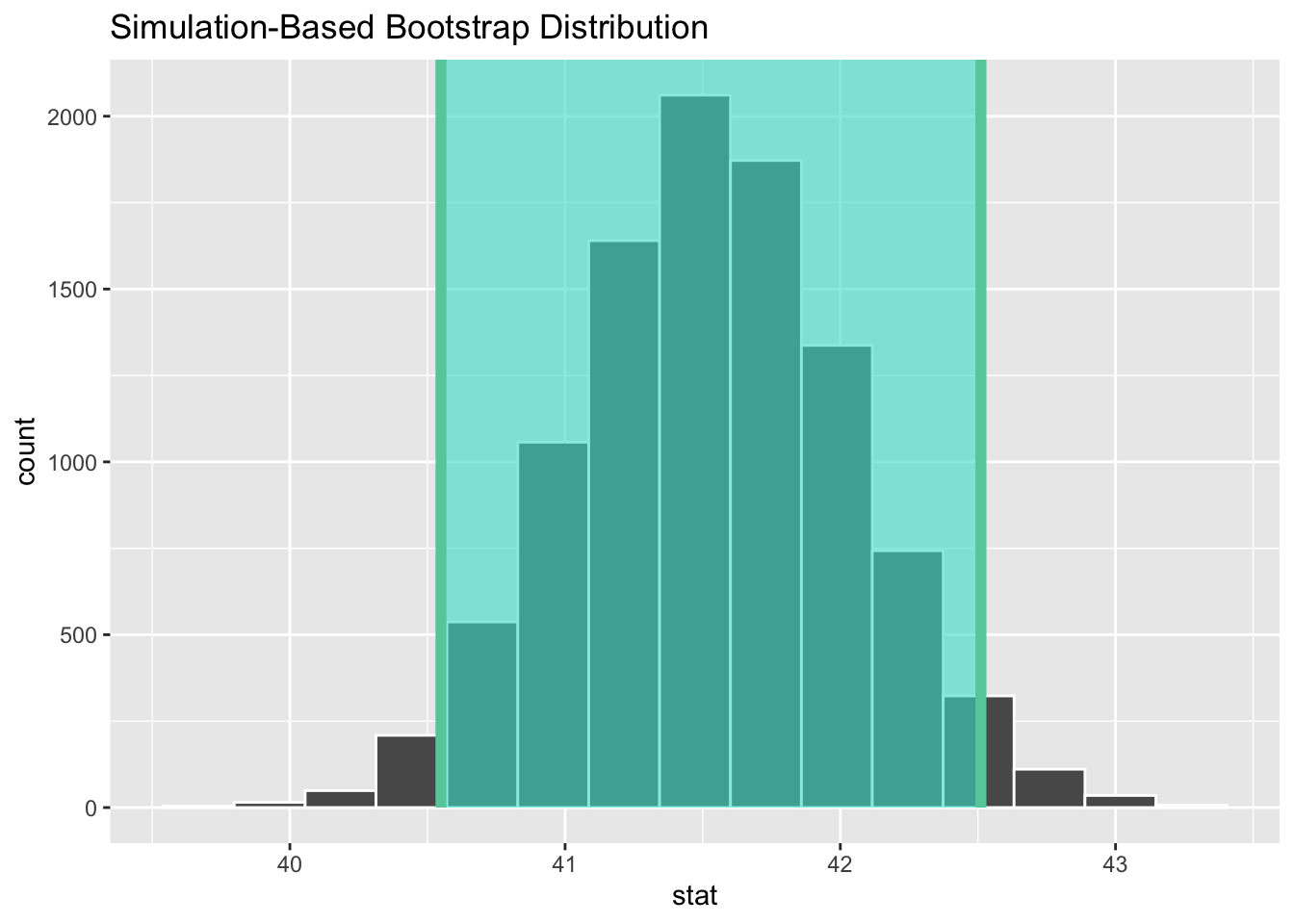
Figure 5.2: Bootstrap Distribution with Shaded Confidence Interval
Above, the CI endpoints that had previously been computed using the percentile method are sent to the shade_ci() function as a vector. However, it is perhaps more convenient to store the output from get_ci() into a variable as shown below, and then send the stored CI to the shade_ci() function. The code below produces the exact same plot shown in Figure 5.2, which shades the bootstrap distribution between its 2.5th and 97.5th percentiles.
# Store the get_ci() results into a variable
percentile_ci <- bootstrap_distribution |>
  get_ci(level=.95, type = "percentile")
# Send the stored get_ci() results to shade_ci()
bootstrap_distribution |>
  visualize() +
  shade_ci(endpoints = percentile_ci)      # percentile_ci contains the CI endpoints
Before moving on to further demonstrate the Infer package, a couple comments are in order. First, the get_ci() and shade_ci() functions also have longer names, get_confidence_interval() and shade_confidence_interval(). Those longer-named functions work exactly the same, so we prefer using the shorter names. Second, all of the above could be accomplished without Infer, simply by using dplyr and ggplot2. Infer provides handy functions for CIs (and hypothesis tests), often using dplyr and ggplot2 functions behind the scenes, but in general Infer is no match for the versatility of dplyr and ggplot2 for data wrangling and plotting.
Again for the sake of comparison, we’ll return to the tvhours_2018 data for which a theory-based single-proportion CI was constructed in Section 4.2. Then Section 5.2 computed bootstrap simulation-based CIs for comparison. Recall the calculation (using dplyr) for the proportion of couch potatoes in the tvhours_2018 data as shown below. For each row in the table, the Boolean logical expression tvhours >= 3 is either true (1) or false (0) which results in a 1 being added to the sum for each couch potato.
# The proportion p_hat of couch potatoes - computed using dplyr
tvhours_2018 |>
  summarize( num_couch_potatoes = sum(tvhours >= 3),  n = n(),  p_hat = num_couch_potatoes/n )
The main hurdle to overcome to use the Infer package to do the same calculation is how the specify() function works for single-proportion bootstrap calculations. For such a calculation, the specified response variable must be a categorical variable with EXACTLY two distinct values. For example, suppose there is a categorical variable named turtle_speed whose only values are slow and fast. Then the function call to specify the response variable to bootstrap the proportion of fast turtles (most likely a small proportion) would be as follows:
specify(response = turtle_speed, success = "fast")
The value of the success parameter must be a character string. The Infer specify() function is not flexible enough to accept a Boolean expression to define success based on the comparison of a numeric variable like \(tvhours >= 3\). Thus, the following does NOT work to identify couch potatoes.
# Can't use logical expression to define success
specify(response = tvhours, success = "tvhours >= 3")    # OOPS - Error
To overcome that, some data wrangling is in order. We’ll simply create a two-value categorical variable to identify couch potatoes using the dplyr mutate() function as shown below. The new is_potato variable is assigned the truth value of each tvhours >= 3 comparison.
tvhours_2018_with_potatoes <- tvhours_2018 |>
  mutate(is_potato = (tvhours>=3))  # new column is_potato = TRUE/FALSE
tvhours_2018_with_potatoes
## # A tibble: 833 × 2
##    tvhours is_potato
##      <dbl> <lgl>
##  1       1 FALSE
##  2       1 FALSE
##  3       4 TRUE
##  4       2 FALSE
##  5       3 TRUE
##  6       3 TRUE
##  7       2 FALSE
##  8       5 TRUE
##  9       0 FALSE
## 10       1 FALSE
## # ℹ 823 more rows
Having properly wrangled the data, the Infer package can be employed to construct a single-proportion bootstrap distribution and a confidence interval. The dplyr code that produced the same single-proportion bootstrap analysis in Section 5.2 is not shown below, but it might be worth a few seconds to compare that code with the more streamlined Infer code below.
# Compute the single-proportion bootstrap distribution
bootstrap_distribution <- tvhours_2018_with_potatoes |>
  specify(response = is_potato, success = "TRUE") |>
  generate(reps = 10000, type = "bootstrap") |>
  calculate(stat = "prop")

# Compute the SE method bootstrap CI
se_ci <- bootstrap_distribution |>
  get_ci(level=.99, type = "se", point_estimate=.340)
se_ci
## # A tibble: 1 × 2
##   lower_ci upper_ci
##      <dbl>    <dbl>
## 1    0.298    0.382

# Visualize the results
bootstrap_distribution |>
  visualize() +
shade_ci(endpoints = se_ci) 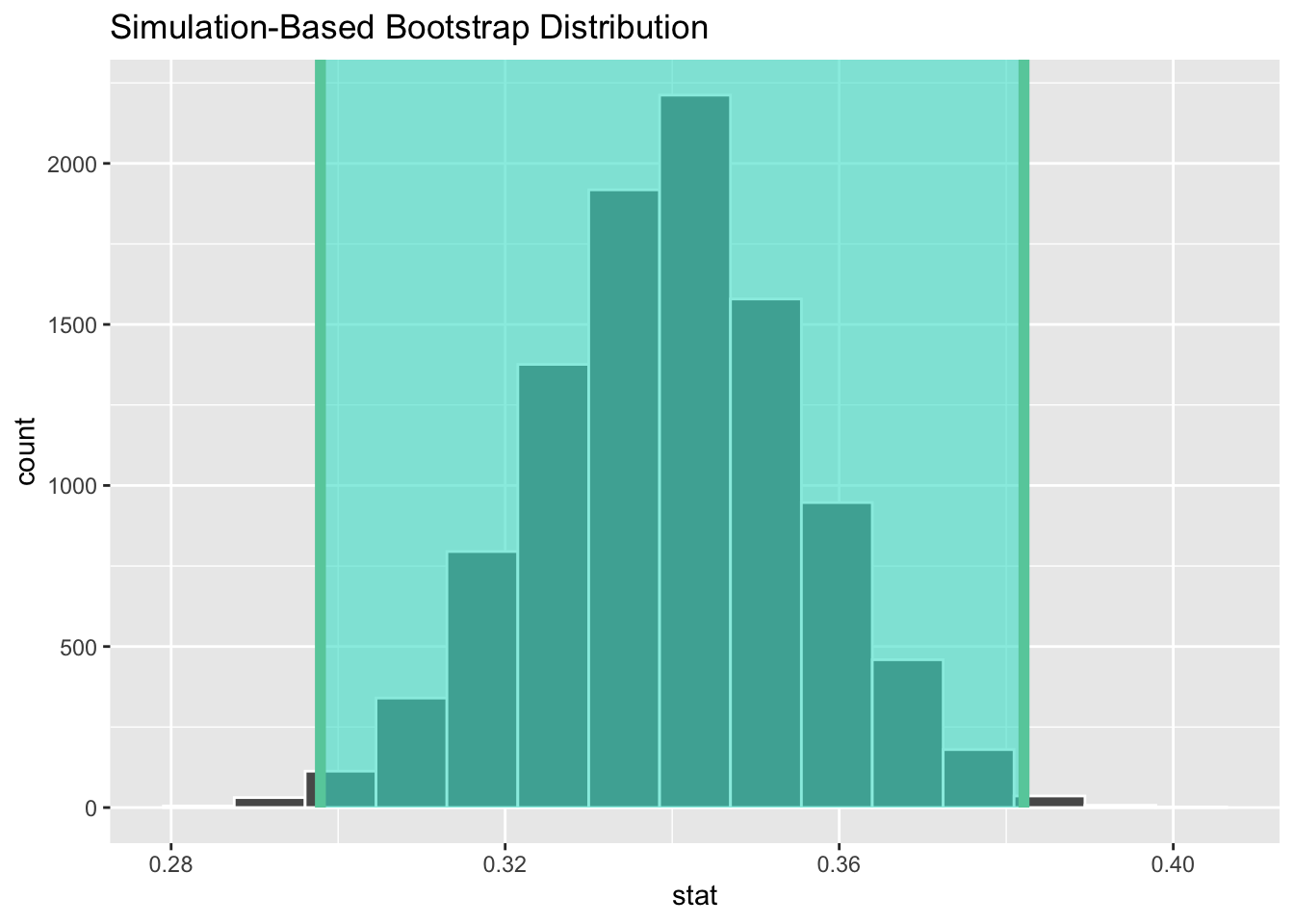
The results are the same as the simulation-based bootstrap SE CI constructed in Section 5.2 using dplyr. Observe above that the point estimate sent to the get_ci() function is the sample stat \(\hat{p}\) we had previously computed in Section 5.2. As shown below, a quick calculation using Infer functions spits out the same value if the bootstrap generate() part is left out.
# Calculate original sample proportion (by leaving out call to generate() bootstrap samples)
tvhours_2018_with_potatoes |>
  specify(response = is_potato, success = "TRUE") |>
  calculate(stat = "prop")
## Response: is_potato (factor)
## # A tibble: 1 × 1
##    stat
##   <dbl>
## 1 0.340
Some extra data wrangling may be required to use Infer, but that does not diminish its overall merits. For the two Infer bootstrap examples above, the corresponding dplyr code is somewhat less streamlined, but still not too much more complicated. However in the next example below, and especially in the next chapter when the Infer package is used for simulation-based hypothesis testing, the amount of technical programming complexity that Infer performs for you behind the scenes is well worth the trade-off of some pre-analysis data wrangling required to put the sample data into a format usable by Infer. That’s often true with programming tools in general, especially well-conceived ones that become popular. The long term benefit of the tool significantly outweighs the start-up cost incurred in learning how to use it.
For the final example of this section, we once again return to some familiar data so that the main focus of the example is learning to use the Infer package. Section 4.4 used the gss_survey data to construct a theory-based difference of proportions CI to compare the proportion of married survey respondents that are couch potatoes to the proportion of non-married ones.
The call to do such a calculation using Infer will be calculate(stat = "diff in props" .... However, for a “diff of” CI the specify() function call that identifies the variables to be used must also include an explanatory variable as shown below.
specify(response = is_potato, success = "TRUE" , explanatory = married_status)
In other words, can the difference in marital status explain whether or not a person is a couch potato?
The catch here is that with Infer, an explanatory variable like married_status must be a categorical variable with EXACTLY two values, perhaps “married” and “single” in this case. Infer uses those two distinct categories to divide the data into two distinct subsets for the “difference of” analysis.
But the status column in the gss_survey data contains several categories: “Married”, “Never married”, “Divorced”, “Widowed”, etc. That was easily overcome in the theory-based approach in Section 4.4 since each proportion was computed separately by doing filter(status == "Married") in one calculation and then filter(status != "Married") in another to grab all the records in the table with NOT married status.
For Infer, the data needs to be transformed by adding a new married_status categorical column with exactly two values as shown below. The first part of the wrangle is the same as in previous examples. The new part is the case_when() part that creates a new two-category married_status column. Based upon the Boolean status comparisons, the new column is either assigned the string “married” or “single”, effectively directing all (status != "Married") survey records into the “single” category. The is_potato column could also be mutated into existence using case_when(), but that one is easier to just wrangle straight into truth values.
gss_survey_2018_wrangled <- gss_survey |>
  filter(year == "2018") |>
  drop_na(tvhours,status) |>
  mutate(is_potato = (tvhours>=3)) |>
  mutate(married_status = case_when(
                              (status == "Married") ~ "married",
                              (status != "Married") ~ "single"
                          )
  ) |>
  select(tvhours,is_potato,status,married_status)
gss_survey_2018_wrangled
## # A tibble: 833 × 4
##    tvhours is_potato status        married_status
##      <dbl> <lgl>     <chr>         <chr>
##  1       1 FALSE     Married       married
##  2       1 FALSE     Married       married
##  3       4 TRUE      Widowed       single
##  4       2 FALSE     Married       married
##  5       3 TRUE      Divorced      single
##  6       3 TRUE      Separated     single
##  7       2 FALSE     Never married single
##  8       5 TRUE      Widowed       single
##  9       0 FALSE     Never married single
## 10       1 FALSE     Married       married
## # ℹ 823 more rows
Now that the data is properly formatted, the “diff in props” bootstrap is easily computed as shown below. Notice the order parameter in the calculation, whose value is a vector with the order for the “difference of” comparison: either \((\hat{p}_{single} - \hat{p}_{married})\) or \((\hat{p}_{married} - \hat{p}_{single})\). We chose
to list “single” first since that is the larger of the two proportions being compared, ensuring that at least the right endpoint of the resulting CI will be positive. But either order works just fine.
bootstrap_distribution <- gss_survey_2018_wrangled |>
  specify(response = is_potato, success = "TRUE", explanatory = married_status) |>
  generate(reps = 10000, type = "bootstrap") |>
  calculate(stat = "diff in props", order = c("single","married"))

bootstrap_distribution |>
  get_ci(level=.95, type = "percentile")
## # A tibble: 1 × 2
##   lower_ci upper_ci
##      <dbl>    <dbl>
## 1   0.0297    0.156

bootstrap_distribution |>
  get_ci(level=.95, type = "se", point_estimate=(.383-.291))
## # A tibble: 1 × 2
##   lower_ci upper_ci
##      <dbl>    <dbl>
## 1   0.0281    0.156
For comparison, both bootstrap CI methods were computed above. The “difference of” point_estimate had been calculated in Section 4.4. Also in that section, the theory-based CI was calculated to be \([.0281, .1559]\) which differs somewhat from the percentile CI above. The tvhours data easily satisfies the assumptions required for trusting the theory-based CI. But the theory-based approach is itself based upon two approximations (normal for binomial, and also \(\hat{p}\) for \(p\)).
Recalling the previous discussions, choosing to trust the theory-based vs simulation-based analysis could simply come down to what a scholarly journal or regulatory agency might prefer. They all agree to about two decimal places, so it’s quite possible that level of accuracy is sufficient. The tvhours data is significantly skewed as can be seen in the histogram shown in Section 4.2, so if the situation calls for a simulation-based CI, then the percentile method would probably be the best choice.
We’ll conclude this section with some final subtleties about the Infer package. Calls to the specify() function can be simplified by using the optional formula parameter. For example, the following two function calls are equivalent.
# Equivalent function calls
specify(formula = is_potato ~ married_status, success = "TRUE")
specify(response = is_potato, success = "TRUE", explanatory = married_status)
Perhaps “simplified” wasn’t the best choice of words above. The formula version is more concise, but perhaps harder to understand. Such a formula is of the general form formula = response_var ~ explanatory_var, thereby eliminating individual response and explanatory parameters. If there is no explanatory variable in the analysis, the formula version must be given as formula = response_var ~ NULL. For relatively simple cases like above either type of notation suffices. But for more complex analyses, the formula parameter provides more flexibility.
Since the above example was using Infer for “difference of proportions”, we’ll conclude this section with a quick note about “difference of means” bootstraps using Infer. The code below assumes that var1 contains numerical data suitable for calculating means, and the explanatory categorical variable var2 has exactly two distinct values “categoryA” and “categoryB” or whatever. With those assumptions, the code below should be self explanatory having discussed the previous example in detail. Note that no success value is specified in an analysis about a mean rather than a proportion.
5.5 Other Bootstrap Tools (Optional)
Two of Infer’s authors, Chester Ismay and Albert Kim, also wrote the Modern Dive textbook, and Infer fits the same Tidyverse workflow. It is not the only way to bootstrap in R. This optional section shows two others on the workhours_2018 sample, whose 95% bootstrap CI was computed with Infer in Section 5.4 to be approximately [40.5, 42.5].
Core R has no bootstrap function, so you write the resampling yourself. Below, sample() draws one bootstrap sample with replacement, replicate() repeats that 10,000 times and collects the 10,000 means in a vector, and quantile() takes the percentiles.
resample_means <- replicate(10000, mean(sample(workhours_2018$workhours, replace = TRUE)))
quantile(resample_means, c(.025, .975))   # percentile method 95% CI
##  2.5% 97.5%
##  40.6  42.5
That is short for one mean from one column, but everything is manual: there is no table of replicates to inspect and nothing like visualize(). For a difference between two groups, like the married vs single comparison in Section 5.4, splitting the data into the groups and resampling each one is your bookkeeping as well.
The boot package is not part of core R, but it is installed along with R, so it only has to be loaded. It has been the standard bootstrap tool in statistics research since the 1990s. You write your statistic as a function of two arguments: the data, and the row numbers that one bootstrap sample happened to draw. boot() does the resampling and calls your function once per bootstrap sample, and boot.ci() computes the CI from the results.
library(boot)
mean_fun <- function(data, indices) mean(data[indices])    # the form boot() requires
boot_results <- boot(workhours_2018$workhours, statistic = mean_fun, R = 10000)
boot.ci(boot_results, conf = .95, type = "perc")           # percentile method 95% CI
## BOOTSTRAP CONFIDENCE INTERVAL CALCULATIONS
## Based on 10000 bootstrap replicates
##
## CALL :
## boot.ci(boot.out = boot_results, conf = 0.95, type = "perc")
##
## Intervals :
## Level     Percentile
## 95%   (40.6, 42.5 )
## Calculations and Intervals on Original Scale
The indices argument is the hurdle: data[indices] picks out the rows of one bootstrap sample, and boot() supplies a different indices vector each of the 10,000 times it calls mean_fun(). In return, boot.ci() offers CI types beyond the SE and percentile methods, including bias-corrected ones that Infer does not provide, which is why research papers tend to use it. Its output is plain text rather than a Tidyverse table. Both CIs above agree with Infer’s to within a tenth; the small differences come from different random re-samples, not from the tools.
5.6 Resources
The R scripts provided below contain code from the main examples featured in this chapter. The scripts are numbered to keep them organized in roughly the same order that the examples were presented. The script numbers do not correspond to section numbers within this chapter.
Download a Zip archive containing all the scripts listed below:
Click on Script for Source Code: